

There’s a running joke in manufacturing: the most expensive tool on the shop floor is the whiteboard. Not because whiteboards are pricey, but because every minute a production manager spends updating one is a minute they’re not actually solving problems.
If you’re running production on NetSuite, you’ve probably felt this. Work orders exist in the system, sure. But try answering basic questions like “what’s behind schedule right now?” or “do we have capacity to take on that rush order?” or “which work orders are stuck waiting on materials?” and suddenly you’re digging through individual records, cross-referencing dates, and building yet another spreadsheet.
We built FactorySync to add exactly this kind of visibility to NetSuite. It brings visual scheduling, capacity planning, and real-time alerts to your existing manufacturing setup. No separate MES system, no integration project, no new logins for your team to forget.
Extending NetSuite Manufacturing with Visual Tools
NetSuite gives you a solid manufacturing foundation. Financials, inventory, procurement, order management, work orders, BOMs. All the core building blocks are there. FactorySync builds on top of that by adding visual scheduling, drag-and-drop planning, capacity views, and proactive alerts. Think of it as the production control room that sits on top of your existing NetSuite data.
Without a visual layer like this, manufacturers end up bridging the gap with whiteboards, spreadsheets, and morning standup meetings where someone reads off a list of work orders. Or they look at a standalone MES, which can mean six figures in licensing, months of integration work, and a whole new system for the team to learn.
FactorySync is the middle ground: MES-level visibility that runs natively inside NetSuite.
See Your Schedule, Don’t Just Read It
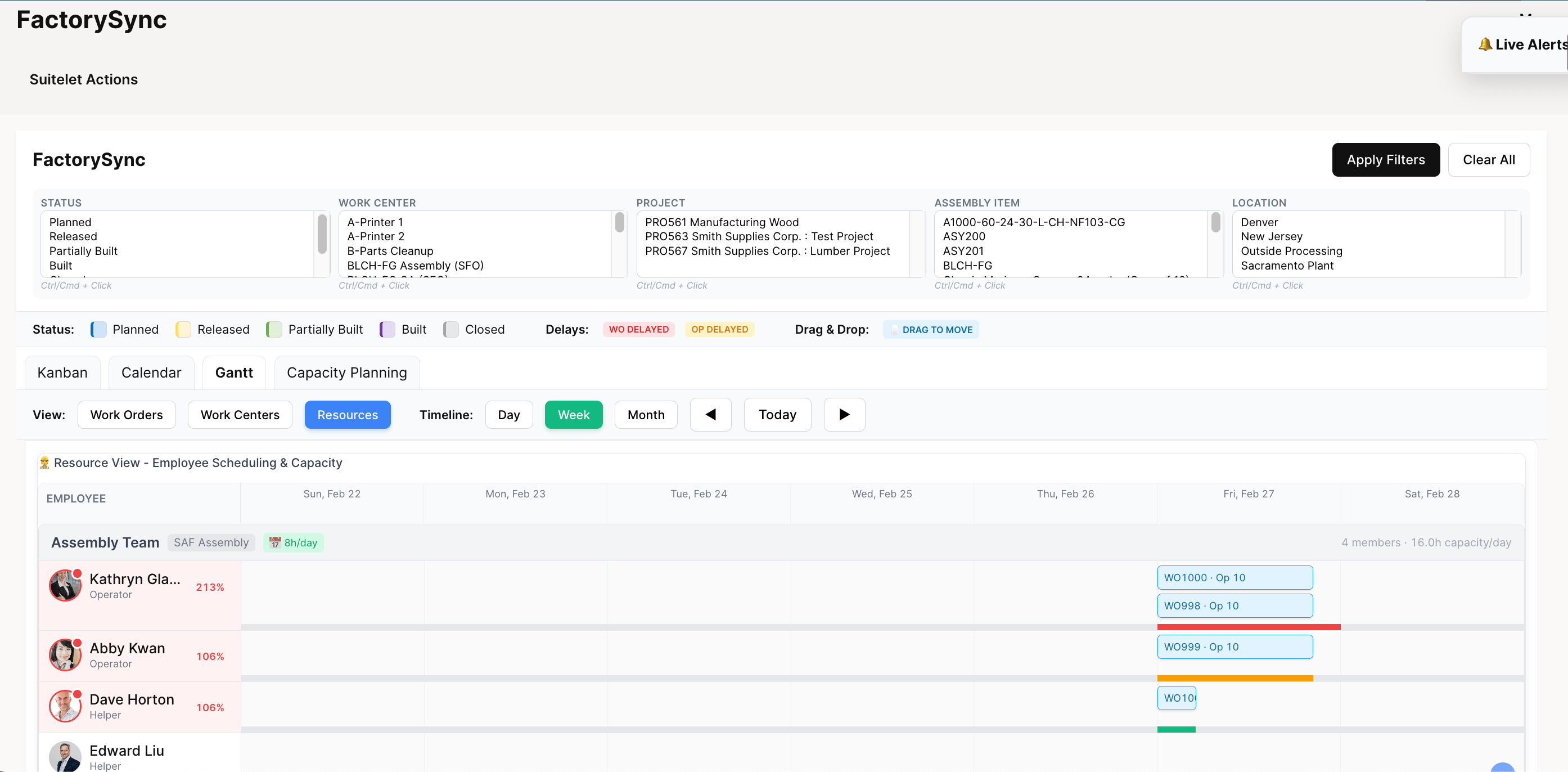
The core of FactorySync is visual scheduling. We give you three different ways to look at your production plan, because different people on your team think differently.
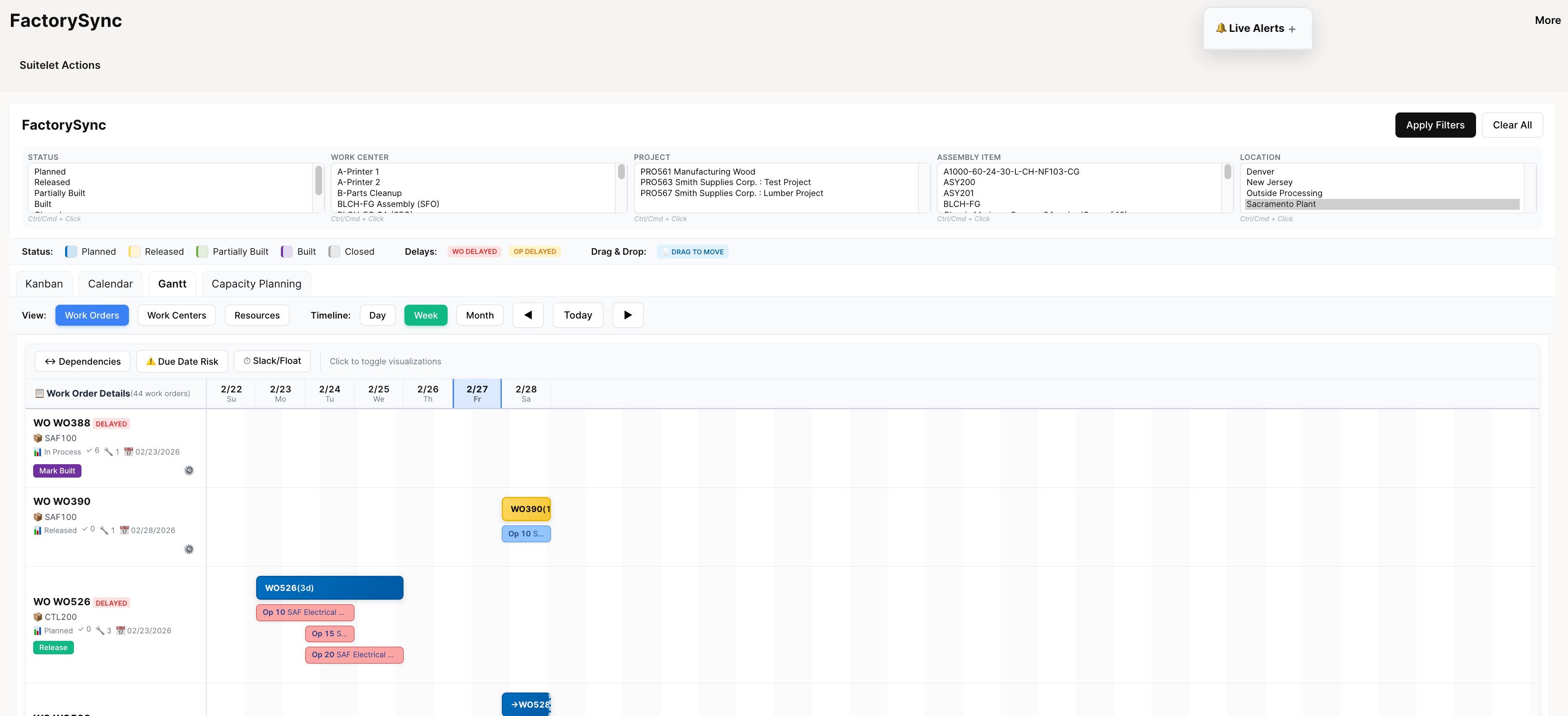
Gantt Charts
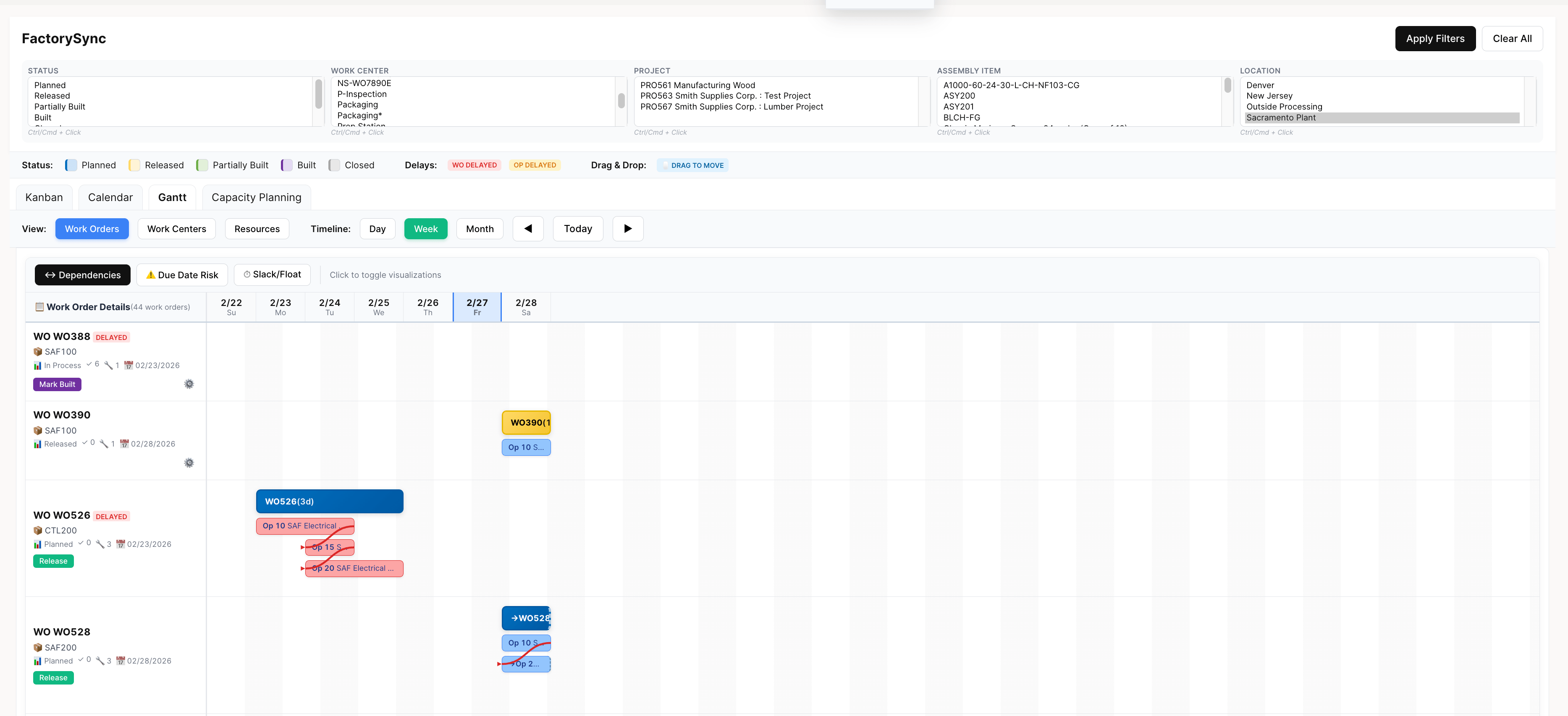
This is where most production planners live. You get your entire timeline across work centers and resources, color-coded by status. Overlapping orders are immediately obvious. Bottlenecks jump out at you. And you can drag work orders around to reschedule. The system handles the cascading updates.
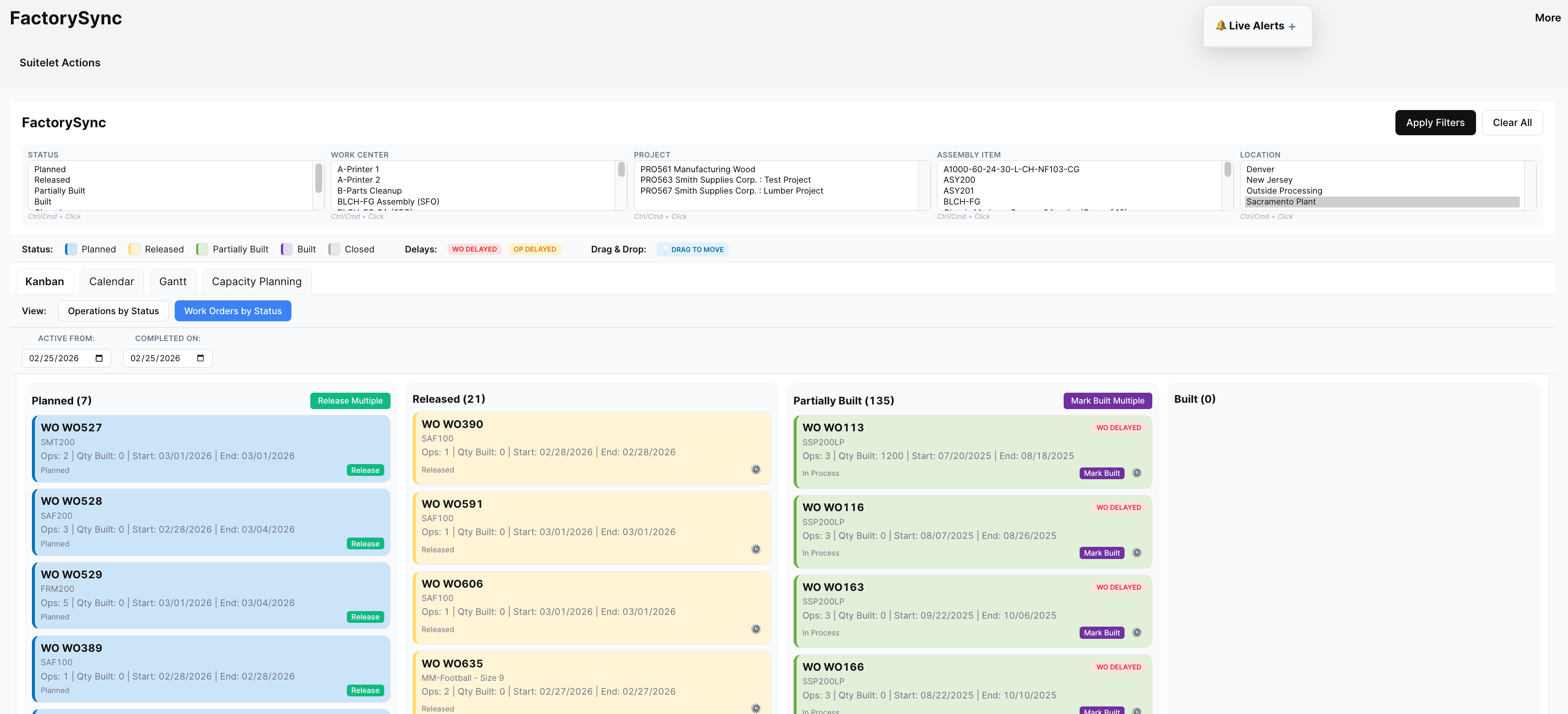
Kanban Boards
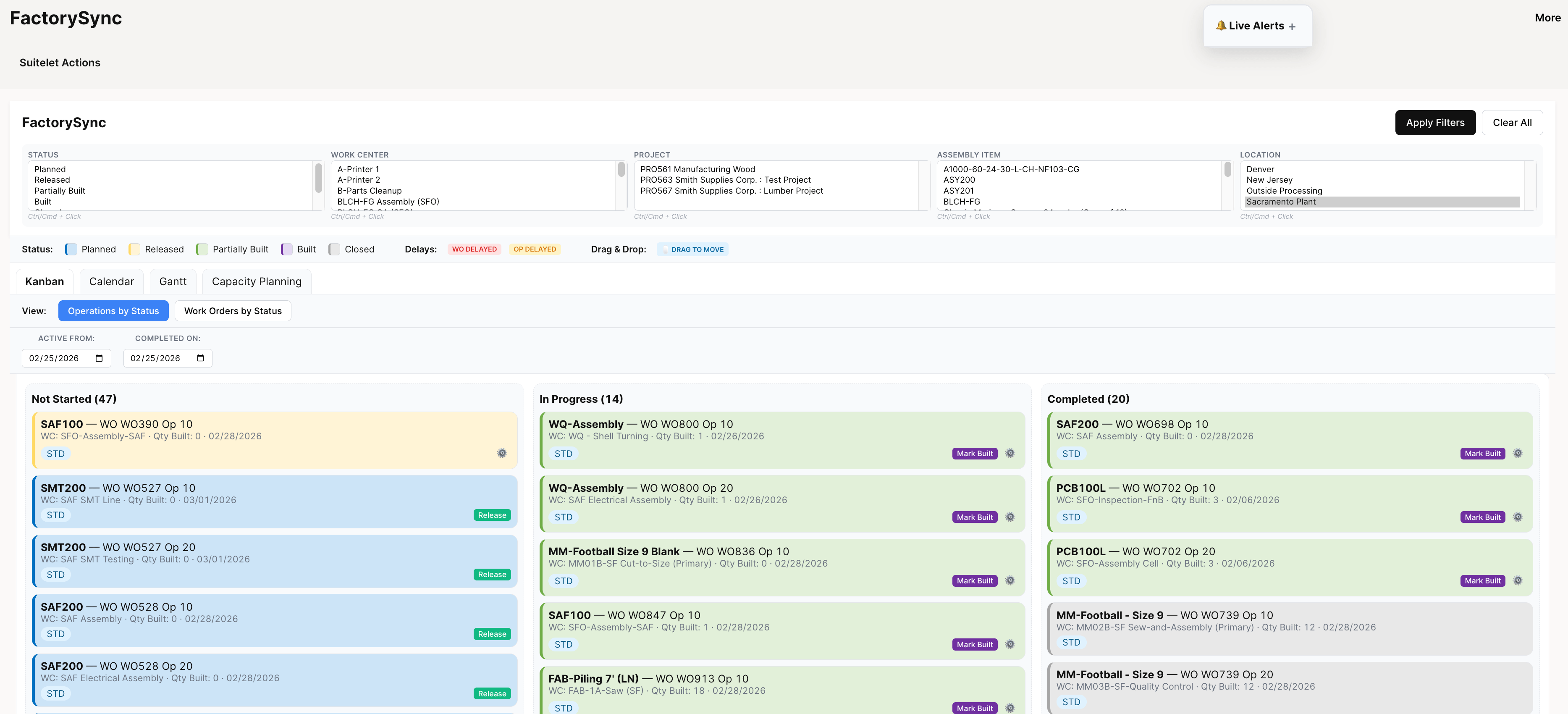
Some shop floor supervisors prefer this view. Work orders as cards, moving across columns as they progress through production. It’s the same data as the Gantt chart, just organized differently. We’ve found that floor-level people tend to gravitate toward Kanban while planners prefer Gantt, but that’s a generalization.
Calendar View
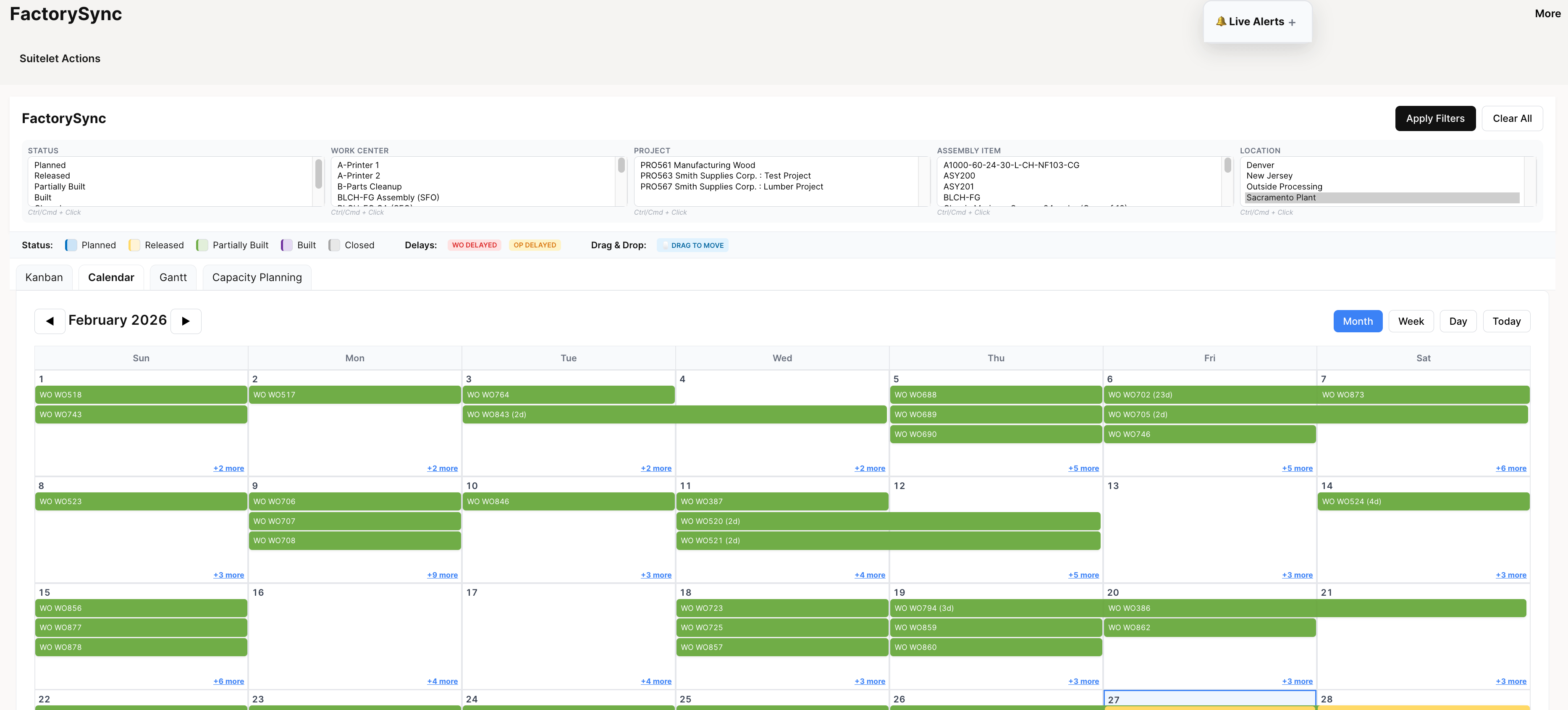
Pretty self-explanatory. A date-based view of what’s scheduled when. Good for identifying gaps in the schedule or spotting weeks that are going to be a problem before they become one.
Do You Actually Have Capacity for That?
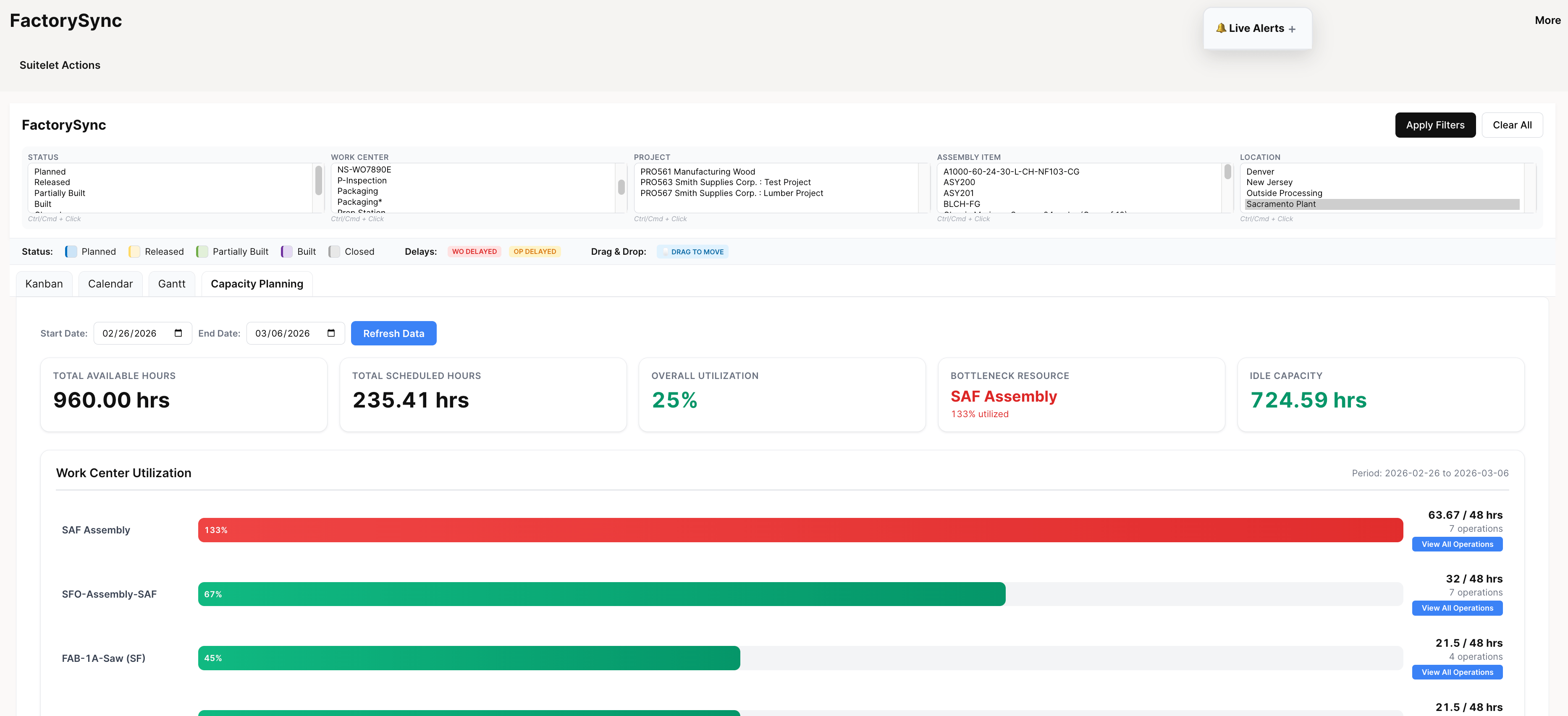
This is the question that trips up so many manufacturers. Sales commits a delivery date. Production finds out two days later that the work center is already at 120% utilization that week. Chaos ensues.
FactorySync’s capacity planner shows you utilization across all your work centers in real time. You can see at a glance which resources are overloaded and which have room. More importantly, you can see this before committing to a timeline, not after.
Alerts That Actually Help
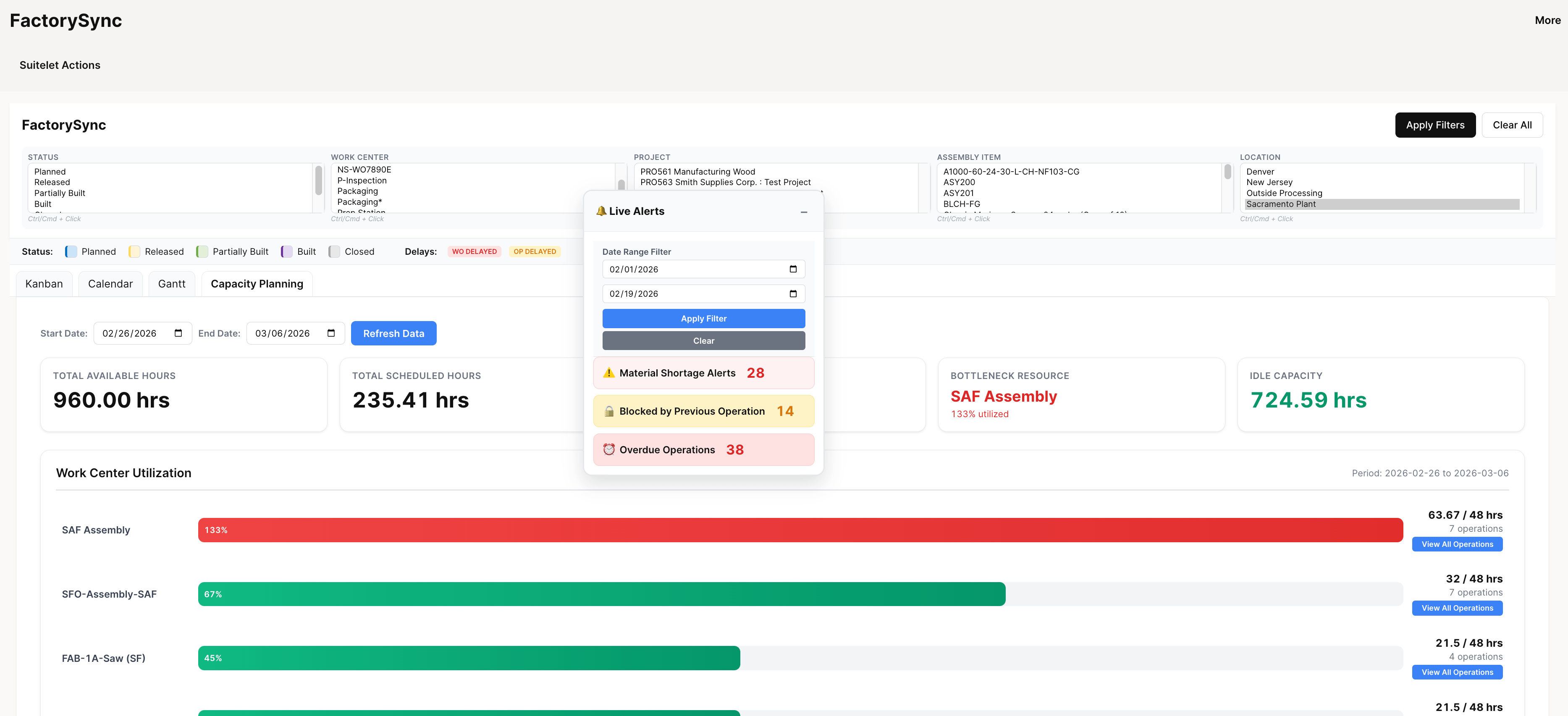
Here’s the thing about production problems: they’re going to happen. Materials show up late. A machine goes down. A customer changes their order at the last minute. The question isn’t if something goes wrong. It’s how quickly you find out about it.
FactorySync’s alert system watches your production floor and flags three things that cause the most disruption:
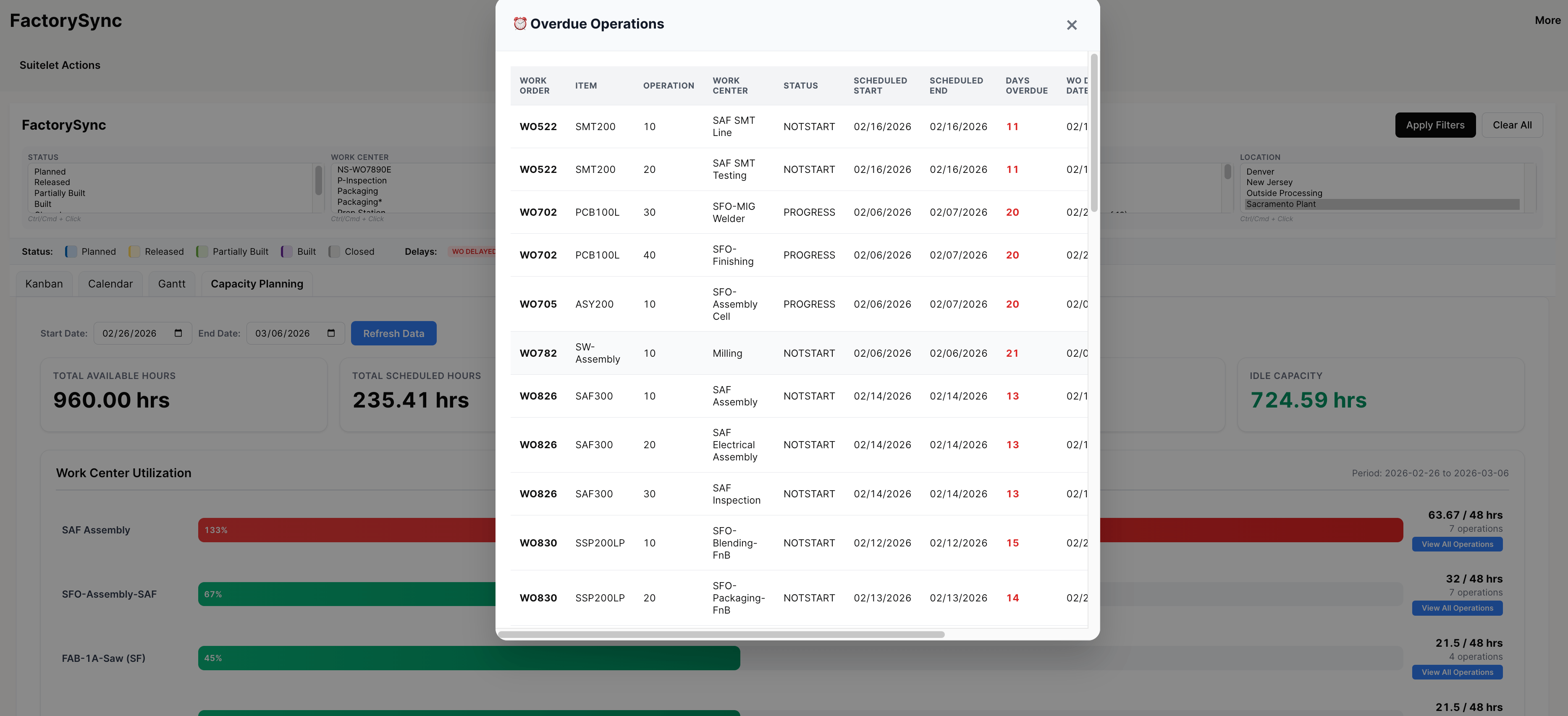
Overdue work orders. An order passed its scheduled completion date and nobody noticed? Not anymore. These get flagged the moment they’re late, so you can reprioritize or at least give the customer a heads-up before they call you.
Material shortages. Before a work order is supposed to start, the system checks if all the required components are actually available. If something’s short, the planner gets alerted with enough time to either reorder or shuffle the schedule. This one alone has saved some of our clients from a lot of “we started production and then realized we were missing a component” situations.

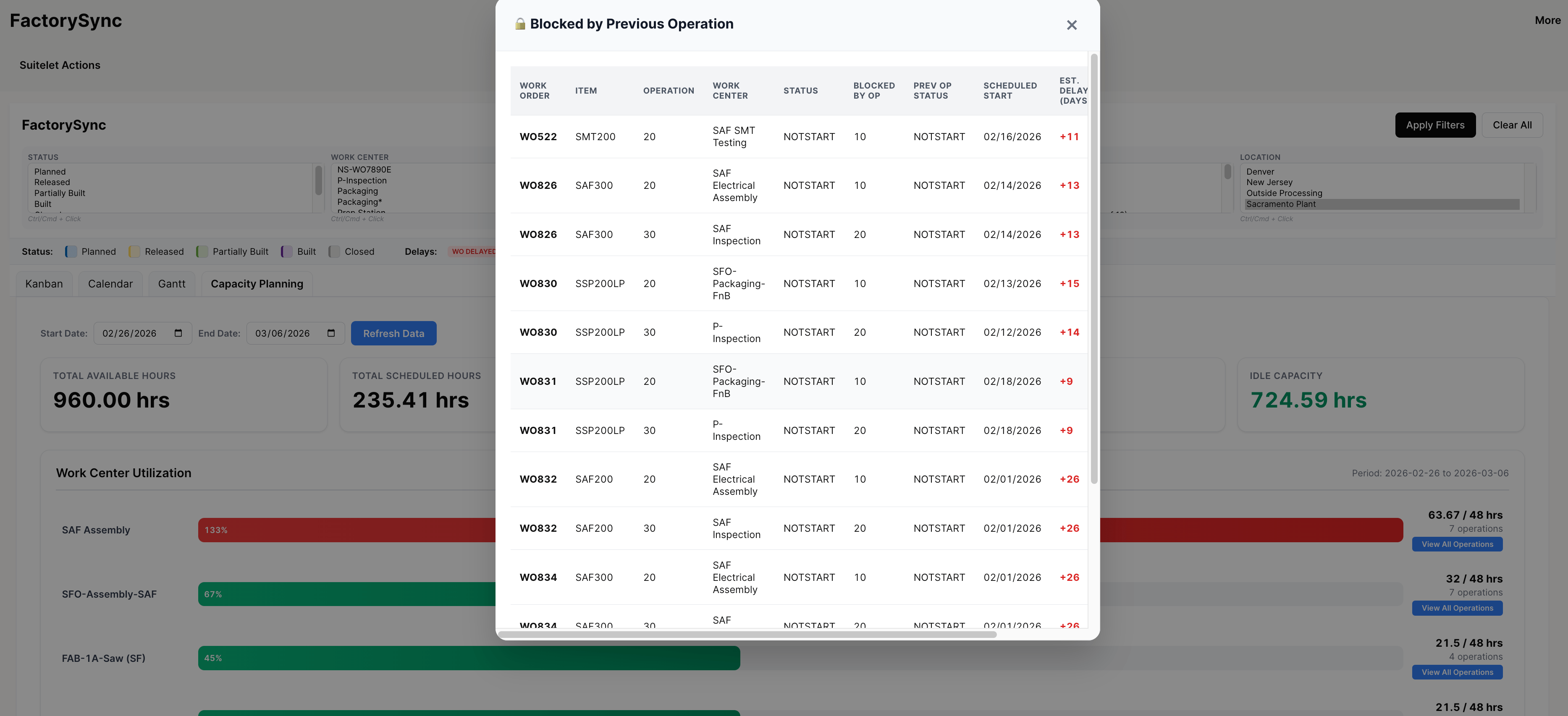
Blocked operations. Something can’t proceed, maybe there’s a dependency, a quality hold, or a resource conflict. Instead of that work order just sitting there (and someone eventually asking “wait, why hasn’t this moved?”), it gets flagged with a reason.
Seeing How Work Orders Connect
In most shops, work orders don’t exist in isolation. You can’t start final assembly until the sub-assembly is done. You can’t start coating until machining is finished. When one order slips, it cascades. FactorySync tracks these dependencies visually, so when something is late, you immediately see the downstream impact.
What Happened at One of Our Clients
A metal fab shop we work with, about 3 work centers, usually 40 to 50 active work orders at any given time, had a production manager who spent the first hour of every day just figuring out what was going on. Walking the floor, checking the whiteboard, updating a spreadsheet, then deciding priorities for the day.
After rolling out FactorySync, that first hour went from “gathering information” to “actually making decisions.” The Gantt chart already shows the full picture. The capacity planner flags overloaded weeks before they happen. And when an order went overdue one Tuesday morning, the alert popped up within minutes instead of someone noticing it three days later during a Friday review meeting.
Their words, not ours: “We went from reactive to proactive overnight.”
“Why Not Just Buy an MES?”
We get this question a lot. And for some manufacturers, a full MES system is the right call. But for most mid-market companies on NetSuite, it’s overkill. You end up with a separate database, integration middleware that breaks when someone updates NetSuite, additional licensing fees, and an IT support burden that never ends.
FactorySync gives you the 80% of MES functionality that actually matters (scheduling, capacity, monitoring, alerts) without any of that overhead. Everything runs in NetSuite. One database. One system. One login. We’ve written more about this on our NetSuite MES comparison page if you want the detailed breakdown.
Getting Started
FactorySync works on its own or alongside our other tools. ProShop for batch manufacturing, LumberSuite for lumber operations. Setup is straightforward: define your work centers, map your routings, and it starts pulling from your existing NetSuite work orders. Most clients are up and running within a couple of weeks.
Want to see it with your own data? Drop us a line and we’ll walk you through it.